Join the Microsoft Dynamics AX Community at https://community.dynamics.com/ax/ today!
Showing posts with label performance. Show all posts

Sunday, January 24, 2016

2012 Unexpected Degeneration of Insert_Recordset Into TempDb Buffer

I recently discovered an interesting degeneration of insert_recordset into a TempDb buffer with huge performance implications.  While I refer only to insert_record in this post, the results apply equally to update_recordset and delete_recordset also.

When used properly, insert_recordset can yield huge performance gains over X++ code loops that execute individual insert statements because the kernel will generate and execute a single SQL statement that allows SQL Server to do the heavy lifting.  An important consideration is whether the target table of the insert_recordset statement has an override of the insert() method.  If so, the kernel will degenerate the insert_recordset into a code loop so that the insert() method can fire for each record.  This degeneration can be avoided with the .skipDataMethods(true) method on the table buffer prior to the insert_recordset command.  All of this is well documented and commonly understood by experienced developers.

This post illustrates a completely different case of degeneration of insert_recordset.

Here I've created a project with a single form, named MyTempDbForm, and a single class, named MyTempDbFormHelper.  In the form, add a data source, and reference it to TmpInventAge which is a TempDb table already available in the AOT.


Since I need to insert data into TmpInventAge, I've created a server static method on MyTempDbFormHelper class that accepts a TmpInventAge buffer by parameter and simply copies the ItemId field from all InventSum records into TmpInventAge records.
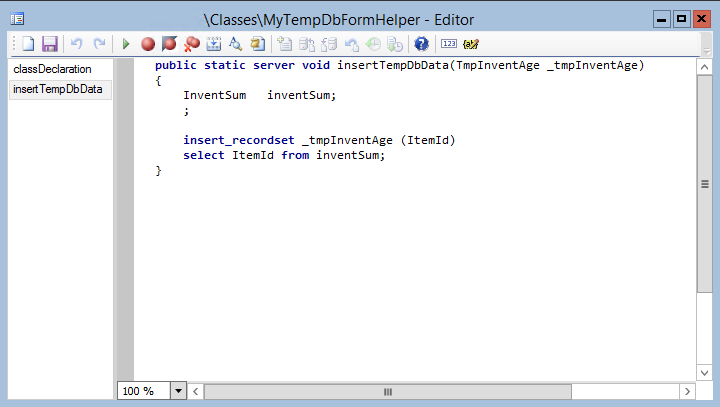


Then I call that method from the executeQuery() method on the form's data source, just prior to the super() call, passing the data source buffer by parameter.


When I open the MyTempDbForm, instead of executing a single SQL statement which should complete nearly instantly, the kernel executes more than 5,000 SQL statements!  This is easily seen with the Trace cockpit, as shown below.  Note the number of Database Calls and the long string of ::doInsert() calls on the TempDb table.


Since TmpInventAge does not override the insert() method, what caused the insert_recordset statement to degenerate into all of those individual SQL statements?

The problem it seems has to do entirely with the use of a client buffer (created by the form data source on the client tier) on the server.  I don't think it entirely makes sense, but with this understanding it can be easily fixed.

The solution is to create a server buffer of TmpInventAge, link it to the client buffer that was passed to the insertTempDbData method (using the linkPhysicalTableInstance() method), and execute the insert_recordset statement against that server buffer instead.


Again using the Trace cockpit shown below, notice the single Database Call and no more ::doInsert() calls, as well as the dramatic improvement in the Inclusive response time.


Friday, January 22, 2016

Microsoft Dynamics AX [multiple versions] - Slow DOCUREF Delete Performance

When deleting DocuRef records, i.e. Document handling, the response can be much slower than expected.  This problem exists in 2012 and goes back to versions 2009, 4.0, and I believe even 3.0.

To understand this issue, one must first understand the relationship between DocuRef and DocuValue records.  When a DocuRef record has an attached file that is being stored in the database, that file is not stored directly on the DocuRef record but is inserted into a DocuValue record instead, and referenced by the DocuRef record using the ValueRecId field.  These DocuRef records can be copied, either automatically by the system under certain conditions, or manually by using the copy/paste function of Document handling.  When DocuRef records are copied, the copied records continue to point at the same DocuValue record, which is not copied.  Thus, a DocuValue can be referenced by many DocuRef records.

The challenge when deleting a DocuRef record that references a DocuValue record is to determine whether or not the associated DocuValue record should also be deleted.  In other words, if during the delete of a DocuRef record, a check must be be made to determine if the associated DocuValue record is referenced by any other DocuRef records, in which case the DocuValue record cannot be deleted yet.  This is also why DocuValue records are not simply cascade deleted from DocuRef.  The many-to-one relationship must be respected.

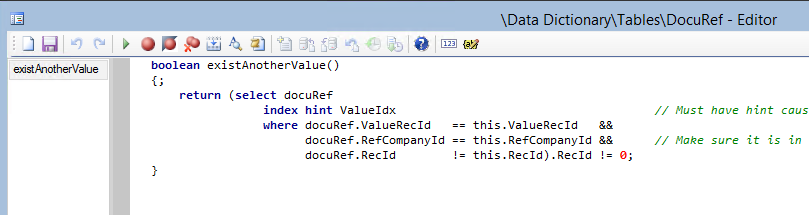
In the delete() method of DocuRef shown below, a call is first made to this.existsAnotherValue(), and then the DocuValue record itself is fetched, followed finally by a check to see if such a record even exists, i.e. DocuValue.RecId.  Technically, this is backwards.


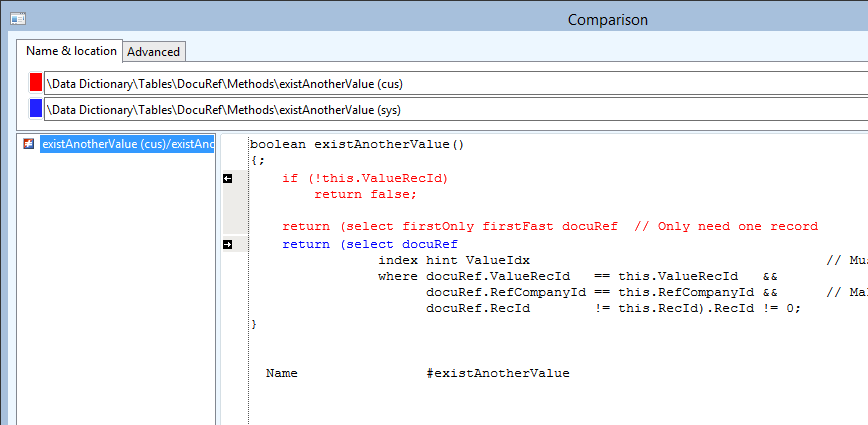
The existsAnotherValue() method executes a query looking for other DocuRef records that reference the same ValueRecId.  Note that it does this even if the ValueRecId is 0, which indicates that no DocuValue record is referenced at all.  When ValueRecId is 0, such a check is meaningless.


There are two optimizations that can be implemented here.

First, no such check for another referencing DocuRef record should be done when ValueRecId is 0, and a simple if statement to completely avoid the database query is a huge performance improvement.  This is especially true considering that likely most DocuRef records do not reference a DocuValue record at all and have 0 for ValueRecId.  Let that sink in for a moment.  Most DocuRef records probably share the ValueRecId of 0, which means the method .existsAnotherValue() can return true even when no DocuValue record even exists.

Second, when such a check is actually necessary, it only matters whether at least one such record exists, so the query hints firstOnly and firstFast minimize that effort.


Together, these two changes highly optimize the performance of the delete() method on the DocuRef table.