Join the Microsoft Dynamics AX Community at https://community.dynamics.com/ax/ today!
Showing posts with label Dynamics AX. Show all posts

Tuesday, January 19, 2016

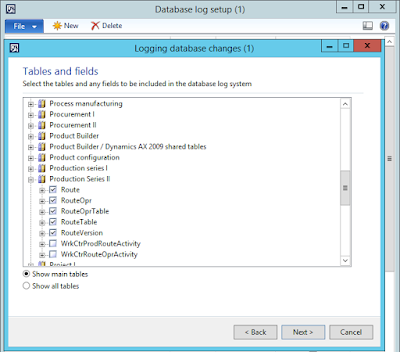
2012 Making Database Log Setup More Friendly

One of the problems with Database log setup is that the wizard shows the tables with their labels, and some of the tables have the same label as others and some have no label at all.

I find using the AOT names of the tables to be far more friendly than the labels.  Since I know the AOT names well, this removes all ambiguity and confusion from the wizard.


Achieving this only requires changing the function tableid2name(..) to tableid2pname(..) in the buildTableTree method on form SysDatabaseLogWizard.

Bug: 2012 R3 Form CustPaymEntry Allows Payment Date Change

When entering into an Accounts receivable payment journal, there are generally two methods for entering a customer payment.  The older method that's been around for many versions is to click Lines, select the customer account, enter the check number, check amount, and then use Functions and Settlements to match invoices and assign cash discounts.

The newer method is to use Enter customer payments which collects all of the necessary steps into one streamlined form.


One major problem with this form is that it allows the Payment date to be changed in cases where it should not be allowed.  For example, once settlements are selected, if any of those settlements include cash discounts or exchange rates, then changing the Payment date should no longer be allowed, and this is exactly how the Customer payment journal works.

The code responsible for this decision is found at Tables\LedgerJournalTrans\isDependantOnSettlement(), and a convenient remark explaining the behavior can be found there.

/// <remarks>
/// This dependency pertains to transaction date, cash discount, and exchange rates. It is used to
/// determine whether the user should be able to change the transaction date of a journal line.
/// </remarks>

This actually makes good sense.  Both cash discounts and exchange rates are date dependent, and so changing the transaction date of the customer payment after settlements are marked could be problematic at best.

The easy fix is to disable the date field altogether on the form, until a more comprehensive fix can be developed or until one is distributed from the product team.  An example of disabling the field is shown below, by setting allowEdit(false) for the TransDate field in the LedgerJournalTrans data source init method.

Bug: 2012 R3 CU10 SrsPrintMgmtController unpack() Stack Trace

Discovering that after upgrading AX 2012 R3 CU8 to R3 CU10, all reports based on SrsPrintMgmtController (pretty much all form letter documents such as Sales order invoice, packing slip, confirmation, etc.) throw a stack trace as follows.

[c]    \Classes\SrsPrintMgmtController\unpack 12
[c]    \Classes\xSysLastValue\getLast 29
[c]    \Classes\SysOperationController\loadFromSysLastValue 29
[c]    \Classes\SrsReportRunController\loadFromSysLastValue 7
[c]    \Classes\SysOperationController\getDataContractInfoObjects 10
[c]    \Classes\SrsReportRunController\parmReportContract 14
[c]    \Classes\SrsPrintMgmtController\init 18
[c]    \Classes\SrsPrintMgmtFormLetterController\init 16
[c]    \Classes\SrsPrintMgmtFormLetterController\startOperation 12
[c]    \Classes\SalesInvoiceController\main 99
[c]    \Classes\xMenuFunction\run 
[c]    \Classes\MenuFunction\run 85
[c]    \Forms\CustInvoiceJournal\Designs\DesignList\SalesInvoiceOriginal\Methods\Clicked 46

The problem turns out to be that this class previously did not have pack() or unpack() methods at all.  Normally when a class that persists state into SysLastValue changes its #CurrentVersion number, the pack() and unpack() methods are modified to accommodate existing SysLastValue records so that no stack trace occurs.  In this case since the class was not previously persisting any state in SysLastValue, it cannot compare the packed state version and throws accordingly.

The easy fix is to delete all SysLastValue records relating to reports with controllers that extend SrsPrintMgmtController.  Normally this is not required for a cumulative update (CU) and is only recommended for a major version upgrade, but CU10 seems to be the exception here.  I have no identified the individual hotfix responsible for this change, so in theory this problem could surface from as much as a single applied hotfix.

Here is a brief list of common (not exhaustive) classes that extend SrsPrintMgmtController and need their SysLastValue persisted state cleared in CU10.

AgreementConfirmController
FreeTextInvoiceController
PurchPackingSlipController
PurchPurchaseOrderController
SalesConfirmController
SalesInvoiceController
SalesPackingSlipController
WMSPickingList_OrderPick

Bug: 2012 R3 CU10 SalesInvoice SSRS Report Stack Trace Using Centralized AR

Discovering that trying to generate a SalesInvoice report in R3 CU10 where the invoice is settled from another company, i.e. centralized AR, throws the following error.  It would seem this could happen with prepayments, but in my case I was merely trying to reprint an old invoice that had already been paid, i.e. settled, from another company using centralized AR.

Cannot create a record in Show invoice (SalesInvoiceTmp).
Insert operations are not allowed across companies. Please use changecompany keyword to change the current company before inserting the record.

The problem stems from code in Classes\SalesInvoiceDPBase\printPrepayment() where a changecompany(offsetcompany) is executed and then later a call is made to Classes\SalesInvoiceDP\insertIntoSalesInvoiceTmp, which fails due to the incorrect company context.  It appears KB3070894 is involved, i.e. "Prepayment applied to a sales order is not printed on the sales order invoice"

2012 R3 KB3062099 Defective?

I've run into an interesting problem with KB3062099, which came on board for us with CU10..  The description reads "Wave attributes are not available or cannot be selected in Work template query, criteria dropdown".

The hotfix changes the following classes in a particular way.

Classes\SysLookup\lookupTableFieldRelation
Classes\SysTableRelation\findRelatedQueryFields
Classes\SysTableRelation\findRelation

The change in each case was the removal of the global function Global::fieldExt2Id(..) from a comparison of field ID's.

It wasn't immediately clear to me why this mattered and broke some lookups/dropdowns on the SysQueryForm, i.e. the range grid after clicking the Select button on most query forms.  Extended field ID's are a little strange it seems.  Normally field ID's are of the range 1-65535 within a table, with numbers 65000 and higher being reserved for system fields like RecId, etc.  When the field is an array, the high order word represents the index into the array for a specific field within that array.  However, there seems to be some sloppiness under the hood with respect to how this works.

In the Developer Network article at https://msdn.microsoft.com/en-us/library/aa630118.aspx, I found the following explanation.

 "Extended field IDs are used to refer to a particular field within a field array. An extended field ID's array index is packed in the high word, and the actual field ID is packed in the low word as shown in the following figure..  Non-array fields also have an array index and are treated as an array field that contains only one element, meaning that their array index is 1. This index can hold the value 0 or 1. The same field can have two different field IDs, one being 1<<16 bigger than the other. These two IDs can be used interchangeably, and the system processes them as if they were identical.  It is best practice to use the fieldExt2Id method to remove the array index part of a field ID, if it is not needed."

So my field number 60013 can also be found as 125548 sometimes, apparently at random.  Unfortunately, the article is clearly wrong in the statement that the system handles both identically.  In the classes above, a simple integer to integer comparison is made between a found field ID in a table relation and an expected field ID from a query, and 60013 does not equal 125548 strictly speaking.  It used to work when fieldExt2Id was used as part of that comparison, but now it is broken.

As a result, some lookups/dropdowns are now broken.

From the hotfix description, I imagine this was done in order to "fix" the Wave attributes lookup/dropdown, which is likely an array given the change that was made.
Master Planning Performance - the Statistics Solution

Since upgrading to Dynamics AX 2012 R3 CU8 in May of 2015, the performance of our multi-company master planning runs at night has been wildly sporadic.  In the best case, the total run time across all companies would average 200 plus/minus 10 minutes or so.  Frequently one company's master planning execution would spike from 15 to 45 or even 60 minutes.  This tended to happen in manufacturing companies, and it seemed more likely to happen in master plans using sales forecasting.

Here's a quick graph of total minutes of execution over the last 90 days or so.


Along the way, we tried upgrading from SQL Server 2012 to SQL Server 2014, and further to SQL Server 2014 SP1 CU3 and finally CU4, to no avail.  In some cases, a strategic DBCC FREEPROCCACHE would correct poorly compiled queries, but not always, and not reliably.

The solution turned out to be a problem with the STATISTICS of the master planning tables.  Since a master plan regeneration can effectively delete and re-insert virtually every record in these tables, it makes some sense that the statistics on these tables could get out of whack so easily and regularly.  Note that we were already using trace flag 2371, and enabled the PARTITION and DATAAREAID literals in our environment immediately after upgrading to 2012 R3.

What worked for us was to setup a SQL Server Agent job to execute the following SQL every 5 minutes throughout the duration of the master planning execution.  All together they take about 15 seconds at our scale.

UPDATE STATISTICS dbo.REQPLANVERSION;
UPDATE STATISTICS dbo.REQPO;
UPDATE STATISTICS dbo.REQROUTE;
UPDATE STATISTICS dbo.REQTRANS;
UPDATE STATISTICS dbo.REQTRANSCOV;
UPDATE STATISTICS dbo.REQUNSCHEDULEDORDERS;

To give some idea of the scale and distribution of our data, here's a record count across some of our companies for the REQTRANS table, sorted from highest to lowest.  It seems like an ideal case for STATISTICS to matter.

[Number of records]
546852
153113
123262
114029
89341
70635
63133
62812
41938
33191
18693
17601
8307
4098
4051
3077
1409
1383
1290
6